
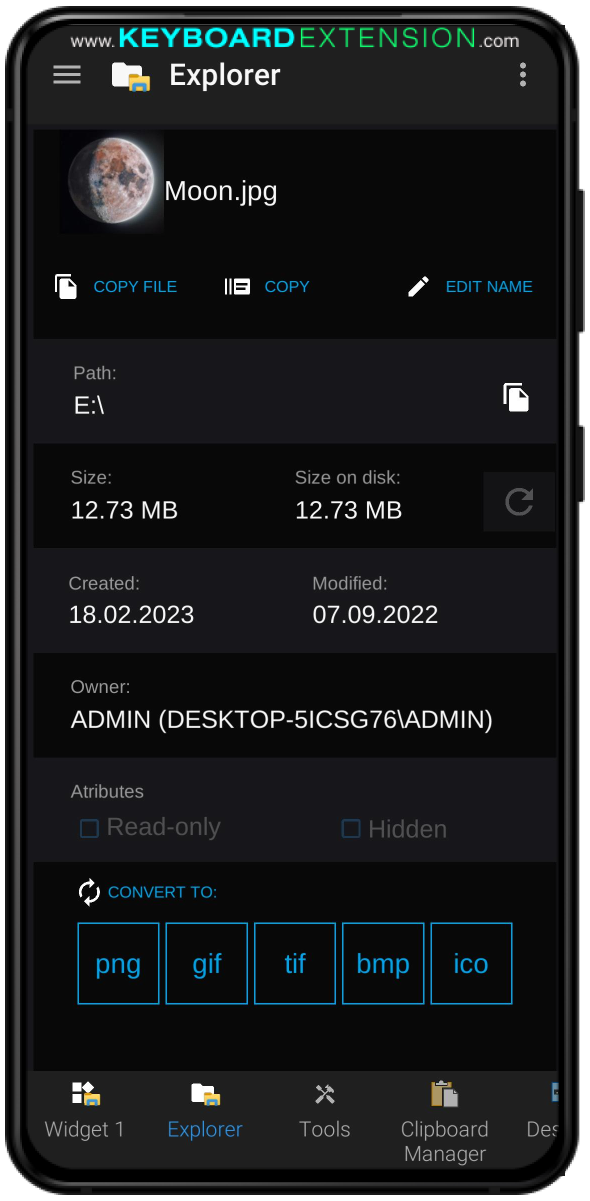
Explorer
-
Works offline, no data sharing
This widget operates entirely without an Internet connection. All data processing and communication happen locally between your computer and Keyboard Extension device. Your personal information and widget data are never transmitted to external servers or shared with us, third parties, or anyone else.
-
No download required
No manual downloads or installation required. Simply activate the application the widget is linked to, and it will appear automatically.
-
Automatic updates
Widgets stay up to date automatically. Updates are checked periodically and whenever you restart the application, with no maintenance required.
-
Plugins included
All required plugins are included at no extra cost
-
Context aware
Widgets activate automatically when a relevant context is detected on your Windows PC, such as switching to a specific application, opening a window, or selecting text.
-
Safety tested
Every widget undergoes internal testing and review before public release to verify its safety, protect user privacy, and ensure it contains no harmful or malicious content.
Free widgets and their associated plugins are already included and become available when you activate the corresponding Windows app. Sign-in may be required.
About this widget
Widget for Explorer and Desktop
Features included
Tap a control to see its details. No commands are sent to your PC.
Activates file rename mode to selected file
Activates file type conversion / extraction. Original file remains unchanged.
Calculates size of selected folder
Combination of one to four keys (a hotkey combination).
Copies path of selected file location to the Clipboard
Copies selected file name (not the file but its name) to the Clipboard
Copies selected file to the Clipboard
Array of available file conversion / extraction actions
File creation date
File modification date
File or folder owner
Formatted file size on disk (not applicable to folders)
Formatted file/folder size
Icon of selected file or folder in BASE64 format
Indicates whether file, folder or root folder is selected in the browser
Indicates whether folder / root folder is selected in the browser
Name of selected file or folder
Path to the selected file location or folder
Title of the file type conversion / extraction action
Value of "Hidden" attribute
Value of "Read only" attribute
Plugins included
Built-in · Version 1.0.0
Autohotkey · Version 7.1.28
How it works
Install the Windows server app and mobile client app (Android or iOS).
Run Keyboard Extension app on Windows PC and smartphone (Apple or iOS). Connect via Wi-Fi, Bluetooth or Web-Server.
 Open Windows Explorer on your PC
The widget becomes available when the application is active.
Use your smartphone or tablet to access the controls.
Screenshots
Explore controls
Choose a control to see its details.
Click a highlighted area to locate its control. Press Esc to close.