
Minecraft Recipes
-
Works offline, no data sharing
This widget operates entirely without an Internet connection. All data processing and communication happen locally between your computer and Keyboard Extension device. Your personal information and widget data are never transmitted to external servers or shared with us, third parties, or anyone else.
-
No download required
No manual downloads or installation required. Simply activate the application the widget is linked to, and it will appear automatically.
-
Automatic updates
Widgets stay up to date automatically. Updates are checked periodically and whenever you restart the application, with no maintenance required.
-
Plugins included
All required plugins are included at no extra cost
-
Context aware
Widgets activate automatically when a relevant context is detected on your Windows PC, such as switching to a specific application, opening a window, or selecting text.
-
Safety tested
Every widget undergoes internal testing and review before public release to verify its safety, protect user privacy, and ensure it contains no harmful or malicious content.
Free widgets and their associated plugins are already included and become available when you activate the corresponding Windows app. Sign-in may be required.
About this widget
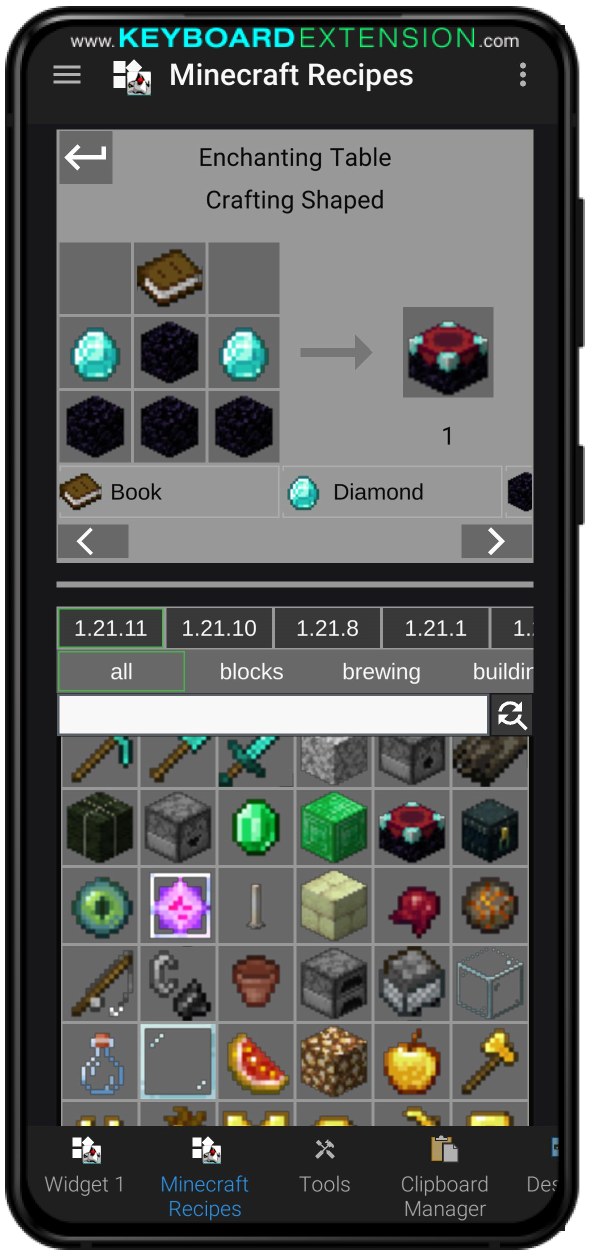
Complete Minecraft Recipe Guide. Instead of memorizing every recipe, simply browse whats available in Minecraft.
Features included
Tap a control to see its details. No commands are sent to your PC.
Back to the main recipe
Currently selected Minecraft version filter
Currently selected recipe category filter
Go to the next sub-recipe
Go to the previous sub-recipe
Name of the selected recipe item
Search for the recipe you need
Select a recipe ingredient out of 9 ingredient options (ingredient panel)
Selecting a recipe ingredient in the ingredients panel
Array of ingredient icons making up the selected recipe
Background color of a recipe component cell
Complete list of items with or without filters applied
Cooking time
Defines visibility of navigation button between sub-recipes
Defines visibility of return-to-parent recipe button (used in top left corner)
Experience points received for crafting
Highlights selected recipe category
Icon of the selected recipe
Indicates selected Minecraft game version
List of ingredient icons in the ingredients panel
List of ingredient names in the ingredients panel
List of Minecraft versions supported
List of recipe categories
Name of the selected recipe output item
Number of sub-recipes available for the same ingredients
Number of units produced by a selected recipe
Type of crafting (Blasting, Brewing, Campfire Cooking, Crafting Shaped, Smelting, Smithing Transform, Smithing Trim, Smoking)
Plugins included
Autohotkey (v2) · Version 254.5.133
How it works
Install the Windows server app and mobile client app (Android or iOS).
Run Keyboard Extension app on Windows PC and smartphone (Apple or iOS). Connect via Wi-Fi, Bluetooth or Web-Server.
 Open OpenJDK Platform Binary (Minecraft) on your PC
The widget becomes available when the application is active.
Use your smartphone or tablet to access the controls.
Screenshots
Explore controls
Choose a control to see its details.
Click a highlighted area to locate its control. Press Esc to close.