
Minecraft Draw Image
Application: OpenJDK Platform Binary (Minecraft)
Executable file: javaw.exe
Company name: Microsoft
Copyright: Copyright © 2025
Supported Versions
16.0.1.0; 17.0.15.0; 17.0.3.0; 17.0.8.0; 21.0.10.0; 21.0.3.0; 21.0.7.0; 25.0.1.0
Version:
34.1.86
Updated:
30 July 2026
Description
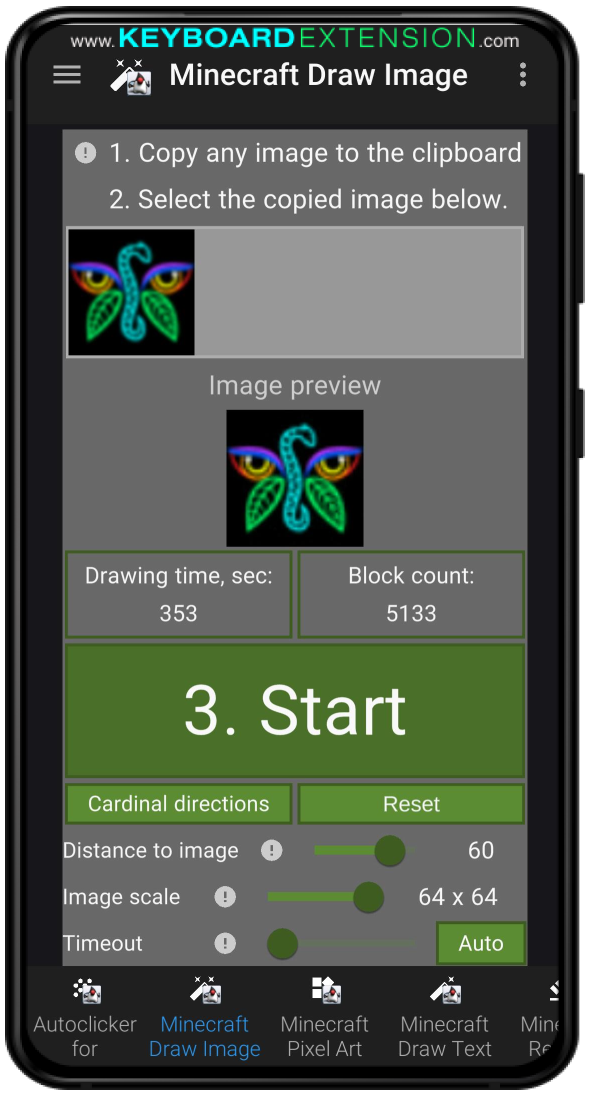
Copy an image to clipboard, select it and then render it in your Minecraft world. You must be in Creative mode.
Controls
|
Control:
|

|
|
Control property:
|
Action.Tap
|
|
Control value:
|
["0","1"]
|
|
Control property description:
|
Starts or pauses image drawing
|
|
Plugin name:
|
|
|
Plugin type:
|
Autohotkey v2
|
|
Parameter name:
|
|
|
Direction:
|
|
|
|
|
|
Control:
|
|
|
Control property:
|
State.Selected
|
|
Control value:
|
1
|
|
Control property description:
|
Script status (running or paused)
|
|
Plugin name:
|
|
|
Plugin type:
|
Autohotkey v2
|
|
Parameter name:
|
|
|
Direction:
|
|
|
|
|
|
Control:
|

|
|
Control property:
|
General.Enabled
|
|
Control property description:
|
Script status (running or paused)
|
|
Plugin name:
|
|
|
Plugin type:
|
Autohotkey v2
|
|
Parameter name:
|
|
|
Direction:
|
|
|
|
|
|
Control:
|

|
|
Control property:
|
Text.Text
|
|
Control property description:
|
Time to draw the image
|
|
Plugin name:
|
|
|
Plugin type:
|
Autohotkey v2
|
|
Parameter name:
|
|
|
Direction:
|
|
|
|
|
|
Control:
|

|
|
Control property:
|
Text.Text
|
|
Control property description:
|
Number of blocks to draw
|
|
Plugin name:
|
|
|
Plugin type:
|
Autohotkey v2
|
|
Parameter name:
|
|
|
Direction:
|
|
|
|
|
|
Control:
|

|
|
Control property:
|
Action.Tap
|
|
Control property description:
|
Reset drawing settings
|
|
Plugin name:
|
|
|
Plugin type:
|
Autohotkey v2
|
|
Parameter name:
|
|
|
Direction:
|
|
|
|
|
|
Control:
|

|
|
Control property:
|
Track.NumericValue
|
|
Control property description:
|
Current timeout value
|
|
Plugin name:
|
|
|
Plugin type:
|
Autohotkey v2
|
|
Parameter name:
|
|
|
Direction:
|
|
|
|
|
|
Control:
|
|
|
Control property:
|
Action.Slide
|
|
Control property description:
|
Sets the timeout between Minecraft console commands
|
|
Plugin name:
|
|
|
Plugin type:
|
Autohotkey v2
|
|
Parameter name:
|
|
|
Direction:
|
|
|
|
|
|
Control:
|
|
|
Control property:
|
General.Enabled
|
|
Control property description:
|
Script status (running or paused)
|
|
Plugin name:
|
|
|
Plugin type:
|
Autohotkey v2
|
|
Parameter name:
|
|
|
Direction:
|
|
|
|
|
|
Control:
|

|
|
Control property:
|
Action.Tap
|
|
Control value:
|
["0","1"]
|
|
Control property description:
|
The waiting time is selected automatically based on the latest log file. It should be disabled in server games.
|
|
Plugin name:
|
|
|
Plugin type:
|
Autohotkey v2
|
|
Parameter name:
|
|
|
Direction:
|
|
|
|
|
|
Control:
|
|
|
Control property:
|
General.Enabled
|
|
Control property description:
|
Script status (running or paused)
|
|
Plugin name:
|
|
|
Plugin type:
|
Autohotkey v2
|
|
Parameter name:
|
|
|
Direction:
|
|
|
|
|
|
Control:
|

|
|
Control property:
|
Background.ImageSource
|
|
Control property description:
|
Shows what the image will look like after it has been drawn
|
|
Plugin name:
|
|
|
Plugin type:
|
Autohotkey v2
|
|
Parameter name:
|
|
|
Direction:
|
|
|
|
|
|
Control:
|

|
|
Control property:
|
General.Enabled
|
|
Control property description:
|
Script status (running or paused)
|
|
Plugin name:
|
|
|
Plugin type:
|
Autohotkey v2
|
|
Parameter name:
|
|
|
Direction:
|
|
|
|
|
|
Control:
|

|
|
Control property:
|
State.Selected
|
|
Control value:
|
1
|
|
Control property description:
|
Displays the status of the selected setting (by compass direction or line of sight)
|
|
Plugin name:
|
|
|
Plugin type:
|
Autohotkey v2
|
|
Parameter name:
|
|
|
Direction:
|
|
|
|
|
|
Control:
|
|
|
Control property:
|
Action.Tap
|
|
Control value:
|
["0","1"]
|
|
Control property description:
|
Places the image according to the cardinal directions or the players line of sight
|
|
Plugin name:
|
|
|
Plugin type:
|
Autohotkey v2
|
|
Parameter name:
|
|
|
Direction:
|
|
|
|
|
|
Control:
|
|
|
Control property:
|
General.Enabled
|
|
Control property description:
|
Script status (running or paused)
|
|
Plugin name:
|
|
|
Plugin type:
|
Autohotkey v2
|
|
Parameter name:
|
|
|
Direction:
|
|
|
|
|
|
Control:
|

|
|
Control property:
|
Text.Text
|
|
Control property description:
|
The selected image size displayed as text
|
|
Plugin name:
|
|
|
Plugin type:
|
Autohotkey v2
|
|
Parameter name:
|
|
|
Direction:
|
|
|
|
|
|
Control:
|
|
|
Control property:
|
General.Enabled
|
|
Control property description:
|
Script status (running or paused)
|
|
Plugin name:
|
|
|
Plugin type:
|
Autohotkey v2
|
|
Parameter name:
|
|
|
Direction:
|
|
|
|
|
|
Control:
|

|
|
Control property:
|
General.Enabled
|
|
Control property description:
|
Script status (running or paused)
|
|
Plugin name:
|
|
|
Plugin type:
|
Autohotkey v2
|
|
Parameter name:
|
|
|
Direction:
|
|
|
|
|
|
Control:
|

|
|
Control property:
|
Action.Slide
|
|
Control property description:
|
Setting the image size
|
|
Plugin name:
|
|
|
Plugin type:
|
Autohotkey v2
|
|
Parameter name:
|
|
|
Direction:
|
|
|
|
|
|
Control:
|
|
|
Control property:
|
General.Enabled
|
|
Control property description:
|
Script status (running or paused)
|
|
Plugin name:
|
|
|
Plugin type:
|
Autohotkey v2
|
|
Parameter name:
|
|
|
Direction:
|
|
|
|
|
|
Control:
|
|
|
Control property:
|
Track.NumericValue
|
|
Control property description:
|
The selected image size as a range
|
|
Plugin name:
|
|
|
Plugin type:
|
Autohotkey v2
|
|
Parameter name:
|
|
|
Direction:
|
|
|
|
|
|
Control:
|

|
|
Control property:
|
Text.Text
|
|
Control property description:
|
Displays the specified distance to image in the world as text
|
|
Plugin name:
|
|
|
Plugin type:
|
Autohotkey v2
|
|
Parameter name:
|
|
|
Direction:
|
|
|
|
|
|
Control:
|
|
|
Control property:
|
General.Enabled
|
|
Control property description:
|
Script status (running or paused)
|
|
Plugin name:
|
|
|
Plugin type:
|
Autohotkey v2
|
|
Parameter name:
|
|
|
Direction:
|
|
|
|
|
|
Control:
|

|
|
Control property:
|
General.Enabled
|
|
Control property description:
|
Script status (running or paused)
|
|
Plugin name:
|
|
|
Plugin type:
|
Autohotkey v2
|
|
Parameter name:
|
|
|
Direction:
|
|
|
|
|
|
Control:
|

|
|
Control property:
|
Track.NumericValue
|
|
Control property description:
|
Displays the specified distance to image in the world as a range
|
|
Plugin name:
|
|
|
Plugin type:
|
Autohotkey v2
|
|
Parameter name:
|
|
|
Direction:
|
|
|
|
|
|
Control:
|
|
|
Control property:
|
Action.Slide
|
|
Control property description:
|
Setting the distance between the image and the viewer
|
|
Plugin name:
|
|
|
Plugin type:
|
Autohotkey v2
|
|
Parameter name:
|
|
|
Direction:
|
|
|
|
|
|
Control:
|
|
|
Control property:
|
General.Enabled
|
|
Control property description:
|
Script status (running or paused)
|
|
Plugin name:
|
|
|
Plugin type:
|
Autohotkey v2
|
|
Parameter name:
|
|
|
Direction:
|
|
|
|
|
|
Control:
|

|
|
Control property:
|
General.Enabled
|
|
Control property description:
|
Script status (running or paused)
|
|
Plugin name:
|
|
|
Plugin type:
|
Autohotkey v2
|
|
Parameter name:
|
|
|
Direction:
|
|
|
|
|
|
Control:
|

|
|
Control property:
|
General.Enabled
|
|
Control property description:
|
Script status (running or paused)
|
|
Plugin name:
|
|
|
Plugin type:
|
Autohotkey v2
|
|
Parameter name:
|
|
|
Direction:
|
|
|
|
|
|
Control:
|

|
|
Control property:
|
General.Enabled
|
|
Control property description:
|
Script status (running or paused)
|
|
Plugin name:
|
|
|
Plugin type:
|
Autohotkey v2
|
|
Parameter name:
|
|
|
Direction:
|
|
|
|
|
|
Control:
|

|
|
Control property:
|
Action.Tap
|
|
Control value:
|
@id
|
|
Plugin name:
|
|
|
Plugin type:
|
Built-in
|
|
Parameter name:
|
|
|
Direction:
|
|
|
|
|
|
Control:
|
|
|
Control property:
|
Background.ImageSource
|
|
Plugin name:
|
|
|
Plugin type:
|
Built-in
|
|
Parameter name:
|
|
|
Direction:
|
|
|
|
|
|
Control:
|
|
|
Control property:
|
Action.LongTap
|
|
Control value:
|
@id
|
|
Control property description:
|
Removes specified clip from clipboard history
|
|
Plugin name:
|
|
|
Plugin type:
|
Built-in
|
|
Parameter name:
|
|
|
Direction:
|
|
|
|
|
Any of our widgets can be altered to meet your needs. Please contact our
customer support
team.
General
Author:
Glisense